香港100M服务器
采用100M BGP混合带宽,可选15M或25M电信CN2带宽,搭配联通、移动直连线路,兼顾内地访问与国际网络连接,适合企业网站、跨境电商及应用部署等业务。


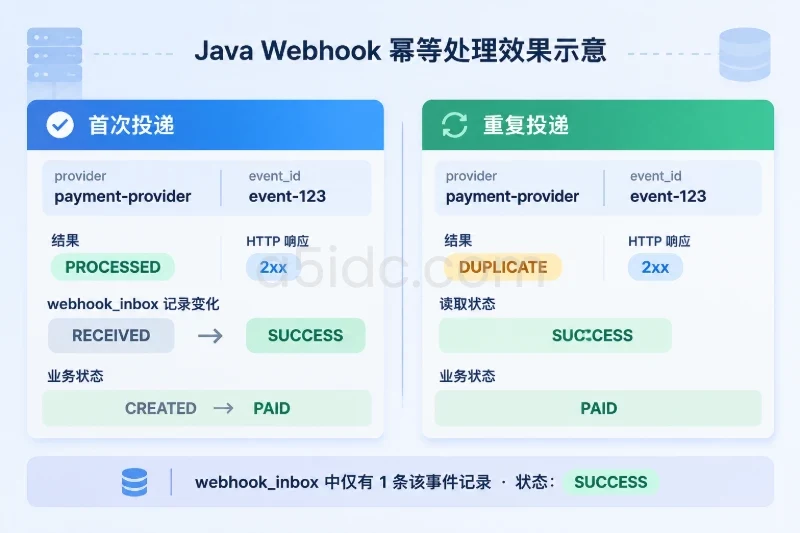
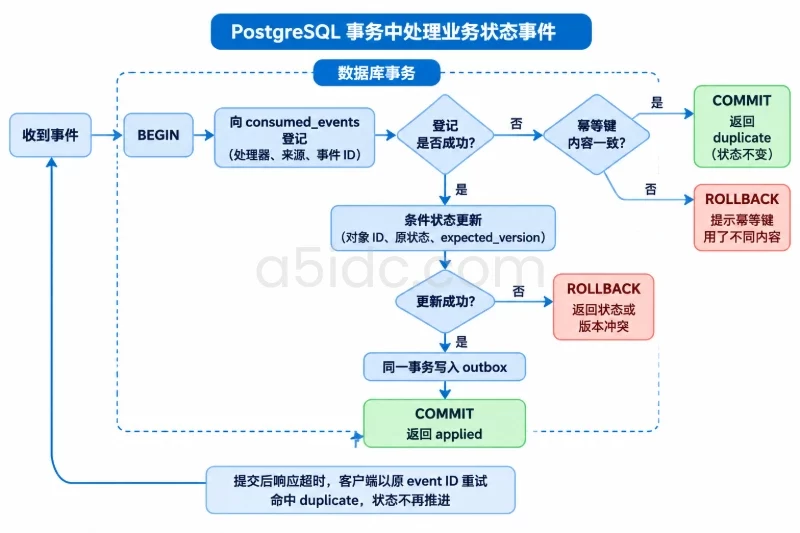
重复事件不能依靠界面按钮禁用或消息队列“只投递一次”来防止重复推进。可靠做法是在服务端为事件设置稳定的幂等键,并在同一个数据库事务中记录该键、校验当前状态和版本、写入新状态;事务提交后,同一事件再次到达只返回重复处理结果,不再推进状态。
下面用 PostgreSQL 和 Node.js 展示一条最小处理链路:事件携带唯一标识及期望版本,服务端只允许指定的状态迁移。数据库事务处理重复投递、并发事件和提交后响应超时;版本不匹配时则拒绝推进,留给调用方判断重试还是作为过期事件处理。
示例按 PostgreSQL 14+、Node.js 20+ 和 pg 8.x 编写。订单初始状态为 awaiting_payment,收到 PAYMENT_CONFIRMED 后变为 paid。version 每次成功迁移只增加 1。
CREATE TABLE business_objects (
    id uuid PRIMARY KEY,
    state text NOT NULL,
    version bigint NOT NULL DEFAULT 0 CHECK (version >= 0)
);

CREATE TABLE consumed_events (
    consumer text NOT NULL,
    producer_id text NOT NULL,
    event_id text NOT NULL,
    object_id uuid NOT NULL REFERENCES business_objects(id),
    event_type text NOT NULL,
    expected_version bigint NOT NULL,
    from_state text NOT NULL,
    to_state text NOT NULL,
    created_at timestamptz NOT NULL DEFAULT now(),
    PRIMARY KEY (consumer, producer_id, event_id)
);

CREATE TABLE outbox (
    id bigserial PRIMARY KEY,
    consumer text NOT NULL,
    producer_id text NOT NULL,
    event_id text NOT NULL,
    object_id uuid NOT NULL,
    event_type text NOT NULL,
    state text NOT NULL,
    version bigint NOT NULL,
    created_at timestamptz NOT NULL DEFAULT now(),
    published_at timestamptz,
    UNIQUE (consumer, producer_id, event_id)
);
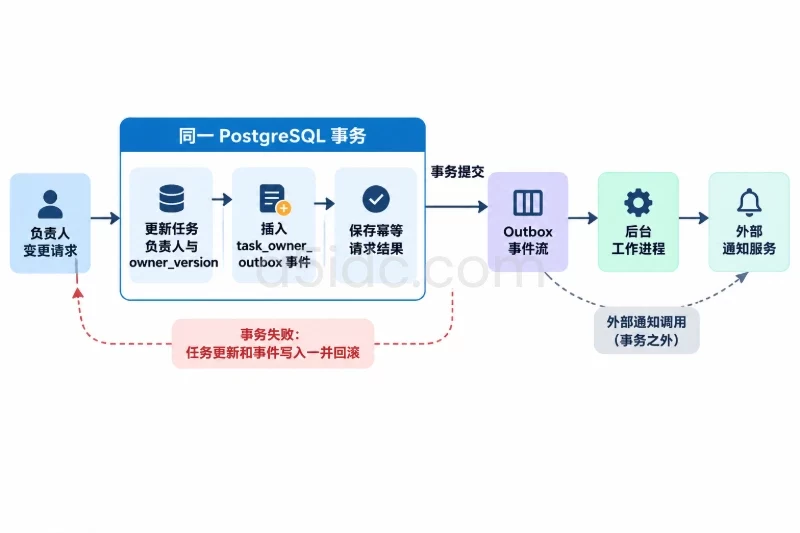
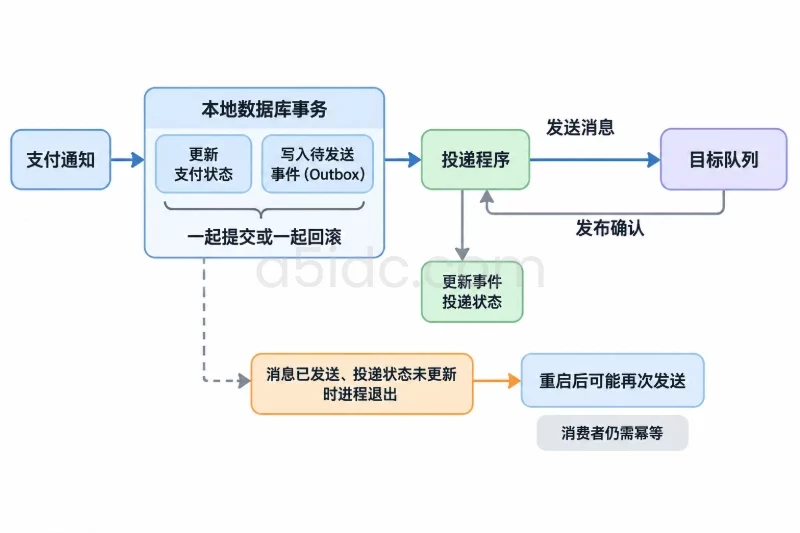
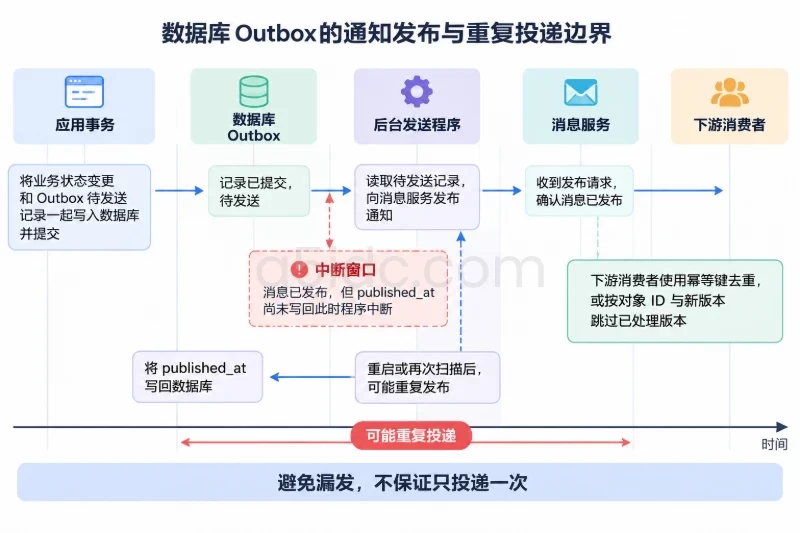
consumed_events 的主键限定同一处理器、同一事件来源下的事件标识只能成功登记一次。outbox 用于在状态事务提交后发布通知:状态更新和待发送通知先一起写入数据库,避免出现状态已变更、进程却在发消息前中断的情况。
实际业务中,事件来源和事件 ID 应来自可信的服务端上下文或上游系统。若上游会为同一业务动作生成不同事件 ID,还需要为支付流水号、任务编号等业务唯一标识增加唯一约束;单靠投递事件 ID 无法识别这种语义重复。
事件类型到状态迁移的映射由服务端控制,不接受调用方任意指定目标状态。下面的函数先登记事件,再按对象 ID、当前状态和期望版本执行条件更新。任一步骤失败都会回滚,因此不会留下“事件已标记处理、状态却未更新”或相反的半成品。
import { Pool } from "pg";

const pool = new Pool({
  connectionString: process.env.DATABASE_URL,
});

const CONSUMER = "order-state";
const transitions = {
  PAYMENT_CONFIRMED: {
    from: "awaiting_payment",
    to: "paid",
  },
} as const;

type EventType = keyof typeof transitions;

interface ApplyEventInput {
  producerId: string;
  eventId: string;
  objectId: string;
  type: EventType;
  expectedVersion: string;
}

class StateConflict extends Error {
  constructor(
    readonly currentState: string | null,
    readonly currentVersion: string | null,
  ) {
    super("当前状态或版本与事件不匹配");
  }
}

export async function applyEvent(input: ApplyEventInput) {
  if (!/^(0|[1-9]\d*)$/.test(input.expectedVersion)) {
    throw new Error("expectedVersion 必须是非负整数的十进制字符串");
  }

  const transition = transitions[input.type];
  const client = await pool.connect();

  try {
    await client.query("BEGIN");

    const inserted = await client.query(
      `INSERT INTO consumed_events
         (consumer, producer_id, event_id, object_id, event_type,
          expected_version, from_state, to_state)
       VALUES ($1, $2, $3, $4::uuid, $5, $6::bigint, $7, $8)
       ON CONFLICT (consumer, producer_id, event_id) DO NOTHING
       RETURNING event_id`,
      [
        CONSUMER,
        input.producerId,
        input.eventId,
        input.objectId,
        input.type,
        input.expectedVersion,
        transition.from,
        transition.to,
      ],
    );

    if (inserted.rowCount === 0) {
      const prior = await client.query<{
        object_id: string;
        event_type: string;
        expected_version: string;
        from_state: string;
        to_state: string;
      }>(
        `SELECT object_id,
                event_type,
                expected_version::text AS expected_version,
                from_state,
                to_state
           FROM consumed_events
          WHERE consumer = $1
            AND producer_id = $2
            AND event_id = $3`,
        [CONSUMER, input.producerId, input.eventId],
      );

      const previous = prior.rows[0];
      const sameEvent =
        previous !== undefined &&
        previous.object_id === input.objectId &&
        previous.event_type === input.type &&
        previous.expected_version === input.expectedVersion &&
        previous.from_state === transition.from &&
        previous.to_state === transition.to;

      if (!sameEvent) {
        throw new Error("幂等键已用于不同事件内容");
      }

      await client.query("COMMIT");
      return { status: "duplicate" as const };
    }

    const updated = await client.query<{ version: string }>(
      `UPDATE business_objects
          SET state = $1,
              version = version + 1
        WHERE id = $2::uuid
          AND state = $3
          AND version = $4::bigint
       RETURNING version::text AS version`,
      [
        transition.to,
        input.objectId,
        transition.from,
        input.expectedVersion,
      ],
    );

    if (updated.rowCount !== 1) {
      const current = await client.query<{
        state: string;
        version: string;
      }>(
        `SELECT state, version::text AS version
           FROM business_objects
          WHERE id = $1::uuid`,
        [input.objectId],
      );

      const row = current.rows[0];
      throw new StateConflict(row?.state ?? null, row?.version ?? null);
    }

    await client.query(
      `INSERT INTO outbox
         (consumer, producer_id, event_id, object_id, event_type, state, version)
       VALUES ($1, $2, $3, $4::uuid, $5, $6, $7::bigint)`,
      [
        CONSUMER,
        input.producerId,
        input.eventId,
        input.objectId,
        input.type,
        transition.to,
        updated.rows[0].version,
      ],
    );

    await client.query("COMMIT");
    return {
      status: "applied" as const,
      state: transition.to,
      version: updated.rows[0].version,
    };
  } catch (error) {
    await client.query("ROLLBACK");
    throw error;
  } finally {
    client.release();
  }
}
调用时,eventId 应在首次处理前生成,并在超时重试时保持不变;expectedVersion 则是发起该迁移时所依据的对象版本。例如:
const result = await applyEvent({
  producerId: "billing-service",
  eventId: "payment-event-8d2f",
  objectId: "7f995849-bc27-4c05-b5cb-f8e78736352f",
  type: "PAYMENT_CONFIRMED",
  expectedVersion: "0",
});
同步接口可将 status: "duplicate" 作为幂等成功响应,将 StateConflict 映射为冲突响应。若事件来自队列,版本不匹配时不要一律确认消息:事件可能只是先于前序事件到达,此时应延迟重试;只有业务规则能确认它已经过期、无需再执行时,才应将其作为终态处理。
| 输入或故障 | 事务结果 | 状态变化 |
|---|---|---|
| 同一事件 ID 和相同内容再次到达 | 查到已登记事件,返回 duplicate | 不变 |
| 同一事件 ID 被用于不同对象或不同内容 | 幂等键内容校验失败,回滚 | 不变 |
不同事件同时以版本 0 推进同一对象 | 只有一个条件更新成功;另一个版本不匹配并回滚 | 最多推进一次 |
| 事件期望版本高于当前版本 | 条件更新失败并回滚 | 不变,可按顺序策略重试 |
| 数据库提交后,服务端响应前发生超时 | 客户端用原事件 ID 重试,命中已登记记录 | 不再重复推进 |
版本条件不是用来代替事件幂等键的:稳定事件 ID 负责识别同一事件的重投,版本和原状态条件负责防止不同事件基于过期状态推进。两者一起使用,才能覆盖重复投递和并发竞争。
不要在数据库事务中直接调用外部消息服务或发送邮件。外部调用可能已经成功,但本地事务随后回滚;也可能本地状态提交后,进程还没来得及发送就退出。上面的 outbox 行与状态变更同事务提交,后台发送程序可在消息确认后填写 published_at。
发送程序也可能在消息已发布、标记尚未写回时中断,因此通知仍可能重复投递。下游消费者应使用自己的幂等键;如果通知本身代表状态变化,也可以携带对象 ID 和新版本,让消费者跳过已处理版本。outbox 负责避免漏发,不承诺消息只投递一次。
界面端可以在请求期间禁用重复提交,并在重试时复用同一个请求幂等键,但这只改善交互体验,不能替代数据库约束。验证时重点检查三个结果:同一事件重放后版本不增加、两个不同事件竞争同一版本时只有一个成功、较新版本先到时不会越过缺失的前序状态。
对于需要承载 Node.js 服务、PostgreSQL 数据处理及后台通知程序的业务,A5idc数据提供香港、美国、日本等地区的物理服务器,覆盖多核处理器、大内存与 SSD/NVMe 存储等配置,可结合访问地区、程序负载和数据规模组织应用与数据服务部署;不同地区还提供相应网络线路选择,便于将状态处理链路放在贴近业务用户的运行环境中。
本文由A5数据原创发布,转载请注明出处:https://www.a5idc.com/helpcontent/9937.html